

Vaultek Support
Slider Series
Support for Slider SL2i
Getting Started
First Steps
Thank you for purchasing the Slider Series safe model SL2i. Let’s get your safe ready for programming with a few simple steps.
Power
This safe is powered by four AAA Alkaline batteries that need to be installed. Under normal usage, brand new batteries can last about 1 year. The included backup keys can be used at any time.
Battery Installation
This safe is powered by four AAA Alkaline batteries that need to be installed. Under normal usage, brand new batteries can last about 1 year. The included backup keys can be used at any time.
1. Open the safe. Key entry is located at back of the safe under the key cover.
2. Remove the battery compartment. Press the tab near the right of the compartment, allowing the battery compartment to slide out.
3. Install four AAA Alkaline batteries. For optimal performance, we recommend Duracell/Energizer or other reputable brands.
Important! Rechargeable batteries are NOT support and may cause issues. Alkaline batteries only.
Optional Plug-In Power
The event you lose the keys and the battery dies, plug-in the safe to a power source.
Low Battery Warning
If the ‘1’ key on the keypad blinks RED several times and you hear several rapid beeps when opening the safe, your battery level is critically low and needs to be replaced.
Battery Power Length
Under normal usage, brand new batteries can last about 1 year. The included backup keys can be used at any time.
Important! Rechargeable batteries are NOT support and may cause issues. Alkaline batteries only.
Low Battery Warning: If the ‘1’ key on the keypad blinks RED several times and you hear several rapid beeps when opening the safe, your battery level is critically low and needs to be replaced.
Programming the Master Code
First time users should change the default code as soon as possible to prevent unauthorized access to your safe, so it should be kept confidential.
Programming Tips!
- Your code can be a minimum of 4 and a maximum of 8 digits. We recommend a code 6 to 8 digits in length..
- Avoid easy-to-guess digits such as 1234, 1111, 2222, etc.
- Two keys cannot be pressed simultaneously.
- Programming a new code will overwrite your previous code.
- Default master code is 1-2-3-4-5 on the keypad.
How to Program the Master Code?
First time users should change the default code as soon as possible to prevent unauthorized access to your safe, so it should be kept confidential.
Step 1. Open your safe.
Step 2. Press and hold the ‘1’ key and the Program button until all the keys light up RED and the safe beeps.
Step 3. Immediately enter in your desired Master Code.
Step 4. Press and hold the ‘1’ key and the Program button again until all the keys light up RED and the safe beeps.
Step 5. Immediately enter in your desired Master Code again.
Step 6. Finally, press and hold the ‘1’ key and the Program button a third and final time until all the keys light up GREEN and the safe beeps.. Now you have successfully programmed your master code.
Change your Master Code at any time by repeating these steps.
Master Code Length
The master code on Slider Series can be 4-8 digits in length.
Programming the Biometric Scanner
You can program up to 20 unique fingerprints on the biometric scanner. The 1st and 2nd fingerprints will be recognized as Admin fingerprints and will be used to authorize additional users 3 to 20. Each fingerprint requires 5 registration scans to be enrolled into the safe.
Fingerprint Tips!
- When enrolling make sure your fingerprints are clean and free of lotions.
- Be sure to use the center of your fingerprint where there is more data to be red.
- If you find you have stubborn prints try using your thumb as it has a more readable surface area.
- To increase your success rate enroll the same fingerprints 4 or 5 times.
How to Program the Biometric Scanner? (Prints 1-2)
The first two prints enrolled on the biometric scanner will be the Admin prints for this safe. Those Admin prints will be required to enroll fingerprints 3 through 20.
Programming Admin Print 1
Step 1. Open your safe.
Step 2. Then press and hold the ‘2’ key and the Program button until the 1 key starts flashing.
Step 3. Immediately scan your print until the safe beeps, then lift and scan again, do this until all keys 1-5 are GREEN.
Step 4. Once all the scans are complete the safe keypad will light up GREEN indicating a successful enrollment.
Troubleshooting! If the LED around the scanner is YELLOW then refer to programming additional prints 3-20.
Programming Admin Print 2
Repeat the above steps to add the 2nd administrative fingerprint.
Step 1. Open your safe.
Step 2. Then press and hold the ‘2’ key and the Program button until the 1 key starts flashing.
Step 3. Immediately scan your print until the safe beeps, then lift and scan again, do this until all keys 1-5 are GREEN.
Step 4. Once all the scans are complete the safe keypad will light up GREEN indicating a successful enrollment.
Troubleshooting! If you are having difficulty with your print, program the same fingerprint 4 or 5 times. You have 20 slots available for programming and you can also try your thumb as it has more surface area to read.
How to Program the Biometric Scanner? (Prints 3-20)
The first and second Admin prints need to be installed to enroll additional prints 3 to 20.
Programming Prints 3 to 20
Step 1. Open your safe.
Step 2. Then press and hold the ‘2’ key and the Program button until the scanner lights up YELLOW.
Step 3. Now scan one of the enrolled Admin prints.
Step 4. Once the scan is approved the ‘1’ key will start flashing.
Step 5. Immediately scan your print until the safe beeps, then lift and scan again, do this until all keys 1-5 are GREEN.
Step 6. Once all the scans are complete the safe keypad will light up GREEN indicating a successful enrollment.
Repeat these steps to enroll additional prints.
Troubleshooting! If you are having difficulty with your print, program the same fingerprint 4 or 5 times. You have 20 slots available for programming and you can also try your thumb as it has more surface area to read.
Deleting Fingerprints
This will remove all the fingerprints stored in the safe.
1. Press and hold the ‘3′ key and Program button together for 3 seconds until all keys (1-5) light up RED then enter your master code.
Mounting
Mount your safe using the included Slider ambidextrous mounting plate to a stationary object.
How to Remove the Mounting Plate?
Slider Series can be secured to vertical surface via the included mounting plate and hardware.
There are multiple configurations for mounting. A four point configuration can be used for standard vertical surface mounting (1.1), two point mounting for installing in a vertical wall stud (1.2), and additional base mounts (1.3). The mounting plate also features standard VESA 75mm and 100mm fitment for use with other adapter plates (1.4). Hardware for VESA fitment not included.
1. Open the safe. Locate the release clip on the same side as the attached mounting plate.
2. Use your thumb or finger to pull the release clip back, and lift the safe off the mount at the same time. The safe will not remove without pulling the release clip back.
Register your safe. Registration provides many benefits three year warranty, technical support, and ordering replacement keys should you misplace them. Visit https://vaulteksafe.com/support/vaultek-product-registration/ and enter the required information in the form and click submit.
Safe Settings and Hotkeys
This safe has settings which are accessible from the keypad hotkeys.
Security Sleep Mode
Activates when six (6) consecutive incorrect keypad entries are entered or (6) incorrect fingerprint scans are made. The safe will not accept any entries for four minutes. If any additional attempts are made the alarm will beep. The security sleep mode can be cleared upon unlock of the safe by any authorized access method including the backup keys.
Open Door Alarm (ON by Default)
This safe features an open door alarm that will sound when the safe door is left open for more than 10 minutes.
1. Press and hold keys ‘3’ and ‘4’ then “Program Button” together for 3 seconds. The keypad will glow GREEN indicating this feature is ON or RED indicating OFF.
Alert of Unauthorized Access (ON by Default)
If toggled ON and someone opens the safe by picking the lock, the keypad will start flashing RED and beep for 8 seconds. It can only be cleared by any authorized access method including the backup keys.
1. Press and hold keys ‘2’ and ‘3’ then “Program Button” together for 3 seconds. The keypad will glow GREEN indicating this feature is ON or RED indicating OFF.
Dual Entry Mode (OFF by Default)
If toggled ON, you will be required to enter your master code and fingerprint (and vice versa) to open the safe.
This mode requires that at least one fingerprint be programmed in the safe and change the default master code before use.
1. Press and hold the ‘4’ key then “Program Button” together for 3 seconds. The keypad will glow GREEN indicating this feature is ON or RED indicating OFF.
Sound (Medium by Default)
By default, the sound is set to Medium.
The sound can be toggled OFF and has three different sound pitches, Low, Medium, and High.
1. Press and hold keys ‘1’ and ‘3’ together for 3 seconds.
If ‘2’ glows red: OFF
If ‘2’ glows green: Low
If ‘2’ and ‘4’ glow green: Medium
If ‘2’ ‘4’ and ‘5’ glow green: High
Interior Light Duration (10 Seconds by Default)
By default, the interior light duration is set to 10 seconds.
The interior light can be toggled OFF and has three different interior light durations: 10 seconds, 30 seconds, and 60 seconds.
1. Press and hold keys ‘3’ and ‘5’ then “Program Button” together for 3 seconds.
If ‘1’ glows green: 10 seconds
If ‘1’ and ‘2’ glow green: 30 seconds
If ‘1’ ‘2’ and ‘4’ glow green: 60 seconds
If ‘1’ ‘2’ and ‘4’ glow red: OFF
Battery Status
Press and hold the ‘5’ key for 3 seconds. Keys ‘1’ to ‘4’ will glow GREEN or RED to indicate the battery level.
If 4 keys glow green: 80%-100%
If 3 keys glow green: 60%-80%
If 2 keys glow green: 40%-60%
If 1 key glows green: 20%-40%
If 1 key glows red: 10%-20%
If 1 key blinks red: less than 10%
Low Battery Warning
If the ‘1’ key on the keypad blinks RED several times and you hear several rapid beeps when opening the safe, your battery level is critically low and needs to be replaced.
Tamper Detection
To check for tampering press and hold keys ‘2’ and ‘4’ together for 3 seconds. The ‘3’ key will glow RED to indicate tampering or GREEN to indicate no tampering.
You can reset the tamper detection by opening the safe through one of the authorized entry points.
Security Sleep Mode: Activates when six (6) consecutive incorrect keypad entries are entered or (6) incorrect fingerprint scans are made. The safe will not accept any entries for four minutes. If any additional attempts are made the alarm will beep. The security sleep mode can be cleared upon unlock of the safe by any authorized access method including the backup keys.
Delete Prints
This will remove all the fingerprints stored in the safe.
1. Press and hold the ‘3’ key and “Program Button” together for 3 seconds then enter the master code. The keypad will blink GREEN indicating deletion of all the fingerprints.
Factory Reset
The factory reset will erase all programmed information and restores the safe to its factory default settings. The master code is rest to 1-2-3-4-5, and the safe will restart.
1. Open the safe using the included key and leave the key turned all the way in the clockwise position.
2. Press and hold keys ‘1’ and ‘5’ then “Program Button” together until the safe restarts.
Specs
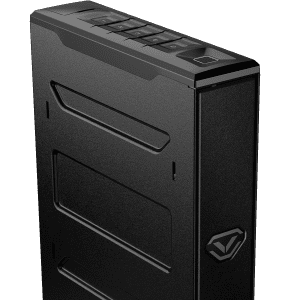
The Vaultek® Slider Series safe model SL2i is a tough and rugged, quick access safe. Its solid structure and penetration resistant design makes it ideal for quick firearm access. Powered four Alkaline batteries, the safe combines high security with complete access control.
Construction
Slider Series safe model SL2i is built from rugged 16-gauge steel, offering durable protection. It features an anti-impact latch that keeps the safe securely locked, even under force or impact, ensuring your firearm remains in place. The included mounting plate, designed with VESA standard fitment, allows for easy installation and enhanced security. Mounting screws are also included in the package for quick setup.
Power
Slider Series safe model SL2i is powered by four AAA Alkaline batteries that need to be installed.
Battery Power: Under normal usage, brand new batteries can last about 1 year. The included backup keys can be used at any time.
Optional Plug-In Power: This safe can be plugged into a power source for continuous power. Great in the event you lose the keys and the battery dies.
Low Battery Warning: If the ‘1’ key on the keypad blinks RED several times and you hear several rapid beeps when opening the safe, your battery level is critically low and needs to be replaced.
Access Points
Slider Series safe model SL2i offers rapid access via Biometric Scanner, Smart Sense Keypad, and Backup Manual Keys.
Biometric Scanner: Can store up to 20 fingerprints. The first two are the admin prints and are needed to enroll additional prints 3 to 20.
Smart Sense™ Keypad: The master code can be 4 to 8 digits in length.
Backup Keys: Two keys are supplied. They are used to open the safe and will be needed to perform important functions such as factory reset.
Mounting Plate
Slider Series can be secured to vertical surface via the included mounting plate and hardware.
There are multiple configurations for mounting. A four point configuration can be used for standard vertical surface mounting (1.1), two point mounting for installing in a vertical wall stud (1.2), and additional base mounts (1.3). The mounting plate also features standard VESA 75mm and 100mm fitment for use with other adapter plates (1.4). Hardware for VESA fitment not included.
1. Open the safe. Locate the release clip on the same side as the attached mounting plate.
2. Use your thumb or finger to pull the release clip back, and lift the safe off the mount at the same time. The safe will not remove without pulling the release clip back.
Factory Reset
The factory reset will erase all programmed information and restores the safe to its factory default settings. The master code is rest to 1-2-3-4-5, and the safe will restart.
1. Open the safe using the included key and leave the key turned all the way in the clockwise position.
2. Press and hold keys ‘1’ and ‘5’ then “Program Button” together until the safe restarts.
Additional Resources
Product Registration
Register your safe. Registration provides many benefits three year warranty, technical support, and ordering replacement keys should you misplace them. Visit https://vaulteksafe.com/support/vaultek-product-registration/ and enter the required information in the form and click submit.
Fitment Template
Simply print the template on an 8.5″ x 11″ sheet of paper and place your valuables on the template to see if they fit. When printing, do not scale to fit, instead print at 100%.
Mounting Plate Template
Simply print the template on an 8.5″ x 11″ sheet of paper and place your valuables on the template to see if they fit. When printing, do not scale to fit, instead print at 100%.
Manual
The following digital product manual are available for use.
Tutorial Library
The following tutorials are available.